Research Impact Challenge 8: The h-Index and Other Citation-Based Measures of Impact
Welcome to Challenge 8 of WSU’s Research Impact Challenge!
In the last challenge, we used The Metrics Toolkit to explore a wide range of approaches to talking about scholarly impact. Today we narrow our focus to indexes of scholarly research and how they can be used to analyze citation data and calculate quantitative measures of research impact.
Let’s get started!
Background: Research Impact Metrics — Citation Analysis
Defining Citation Analysis
What is it?
- Citation analysis is the study of the impact and assumed quality of an article, an author, or an institution based on the number of times works and/or authors have been cited by others.
Why use it?
- To find out how much impact a particular article has had by showing which authors based some work upon it or cited it as an example within their own papers.
- To find out more about a field or topic; i.e. by reading the papers that cite a seminal work in that area.
- To determine how much impact a particular author has had by looking at the number of times his/her work has been cited by others.
WSU Library Guides can help.
Comparing Tools for Citation Analysis
- Here is a quick summary of what to expect from two of the best-known citation analysis tools, Web of Science and Google Scholar:
| Web of Science | Google Scholar | |
| Subject Focus | Science Citation Index Social Science Citation Index Arts & Humanities Citation Index | Theoretically, all disciplines |
| Coverage | Over 12,000 peer-reviewed journals Over 1,300 open access journals 30,000 books with 10,000 added annually Over 2.6 M chemical compounds and 1 M chemical reactions 148,000 conference titles with 12,000 added annually | Books from Google Books Dissertations Peer-reviewed articles Patents Case law Trade journals Slide presentations Gray literature Newsletters Syllabi (if cited by scholarly articles) |
| Time Span | Some journals from 1900 | Some citations as far back as the 1660s and 1670s |
| Updated | Weekly | Unknown but generally quick |
| Strengths | Excellent search limits by discipline The most well-known and most used resource for citation analysis Citation analysis goes back farther than Scopus | Excellent resource for finding cited references It’s free May find more obscure references |
| Weaknesses | Weaker Arts/Humanities & Social Sciences content than Scopus | Too much irrelevant content in search results Few options for sorting results |
Today’s challenge: the h-index
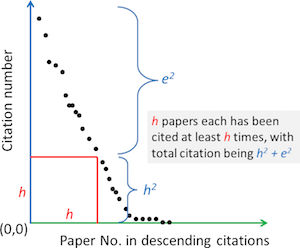
Today’s challenge focuses on just one metric, the h-index. Created in 2005 by physicist Jorge Hirsch, the h-index is intended to be a measure of both the productivity and the impact of an individual author. A scholar has an index of h when they have published h papers, each of which has been cited at least h times (Sugimoto, Cassidy R. and Vincent Larivière).
The h-index is hotly contested and known to be problematic, and yet it is commonly used and a metric you’re likely to encounter without even seeking it out. This is why we’ve chosen it as the focus for today’s challenge.

Find your h-index:
Follow the instructions below, adapted from the WSU Libraries Guide for Measuring Research Impact, to locate an h-index for the same author in Web of Science, and Google Scholar. If your publications have been indexed in both places, we recommend that you search for your own name. If not, search for a scholar whose work you have used in your research.
Here’s how to do it:
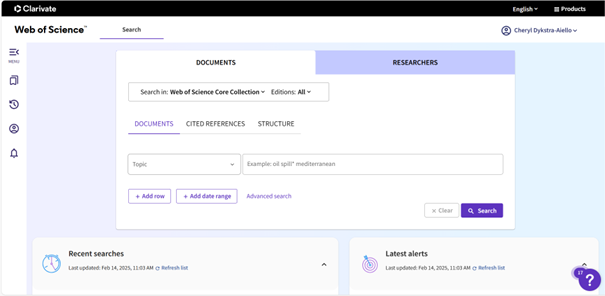
- Web of Science through WSU Libraries
- Click “Web of Science” above.
- You can also access the Web of Science website through the “WSU Libraries” link above. Once on the Libraries site, just scroll to the bottom of the page to find the link.
- Sign in to Web of Science using your WSU email address.
- Click on the “Researchers” tab to search for an author.
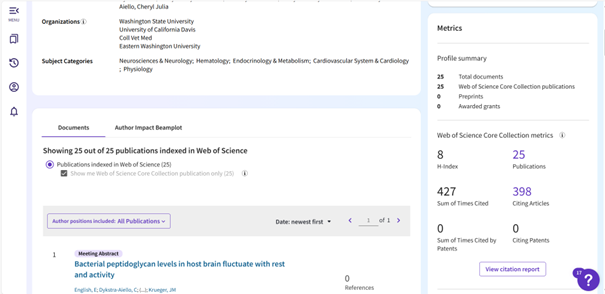
- On the author search results page, you can see their “Metrics” on the right side of the screen where you will also be able to “View Citation Report”.
- Click “Web of Science” above.
- Google Scholar
- Click “Google Scholar” above.
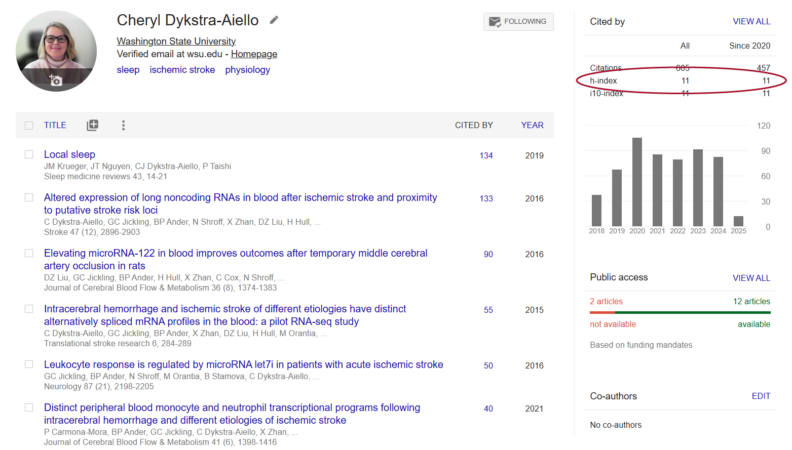
- If you are searching for yourself, you can simply navigate directly to the Google Scholar profile you previously created. Your h-index will appear in the box on the right-hand side of the screen.
- If you are searching for a different author, in the main search box, enter the author’s name or search by article title. In the search results page, click on the author’s name to view their Google Scholar profile (your chosen author will need to have a public Google Scholar profile in order for you to view their Google Scholar h-index).

Reflect on what you find:
- Does the h-index stay the same or vary across these databases? If the score changes, can you figure out why?
- What strengths do you see in the h-index as a measure of productivity and impact? What limitations do you see?
- If asked to provide an h-index as part of an evaluation process, how would you proceed?
Key Takeaways:
- The h-index always depends upon the data source from which it was calculated. When reporting an h-index, you will always want to indicate the data source.
- The Google Scholar h-index will often be higher than the h-index from other sources. This is because Google Scholar is more inclusive than Web of Science, indexing many more types of material than peer-reviewed research articles.
- The h-index inherently favors scholars with longer careers, who have had the time both to publish more work and to accrue more citations.
- The h-index will not adequately represent the work of scholars whose publications are not all indexed in the data source being used.
What next?
- Explore further in the WSU Library Guide: Measuring Research Impact Using Web of Science, Altmetrics, and Other Sources an overview of other research impact metrics, as well as broader context for research impact evaluation (including a sneak preview of altmetrics, the topic for Challenge 9, and the responsible, ethical application of research impact metrics, which will be addressed in Challenge 10).
- For a quick, at-a-glance reference, this poster from Elsevier Library Connect provides a user-friendly overview of key research impact measures.
- In this video (less than 5 minutes long!), Heather Coates, digital scholarship and data librarian at Indiana University-Purdue University Indianapolis, provides a general introduction to research impact metrics and describes how such metrics may affect humanities scholars.
Learn more:
- Jacso, P. (2008). Testing the Calculation of a Realistic h-index in Google Scholar, Scopus, and Web of Science for F. W. Lancaster. Library Trends 56:4, 784-815.
- Fraumann, Grischa and Mutz, Ruediger, The h-index. Dec. 2021. DOI: 10.48550/arXiv.2112.02175
- Sugimoto, Cassidy R. and Vincent Larivière, Measuring Research: What Everyone Needs to Know® (New York, 2018; online edn, What Everyone Needs to Know®, Nov. 2020), DOI: 10.1093/wentk/9780190640118.001.0001. (Available online through WSU Libraries).
- This practical, accessible handbook provides valuable history and critical context for the major research impact measures and data sources. Highly recommended for those who want to dig deeper!
Prepare for the next challenge:
Congratulations! You’ve completed Challenge 8 of the Research Impact Challenge! Challenge 9 will explore the emerging field of altmetrics, including tools you can use to keep up-to-date on when your work is mentioned on the web, in the media, in a syllabus, in policy, and more!